







Landing Page Countdown Timer - Shopify Essential Countdown App
Essential Shopify landing page countdown timer is a wonderful way to notify all of your e-commerce store customers about current promotions or sales.
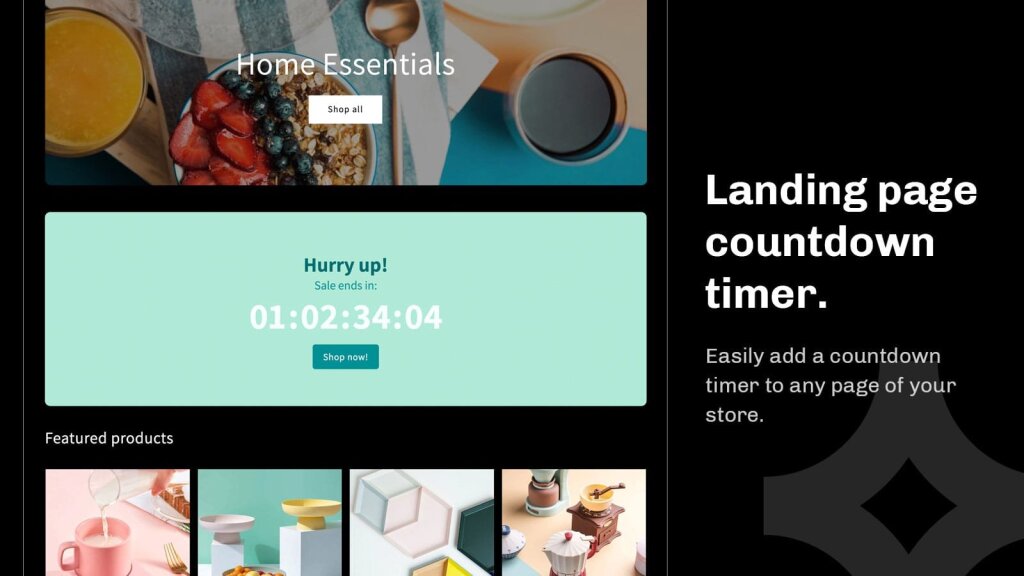
The landing page countdown timer is a wonderful way to notify all of your e-commerce store customers about current promotions, sales, or upcoming events. Add it as a block to any of your Shopify store pages to communicate a promotion and drive your traffic to your desired page.
The integrated call-to-action is great for sending your customers to a certain page or promotion. You can choose from adding a button or simply making the whole bar clickable. Just add the link to where you want your top-bar timer to redirect your users, and you’re all set.

Landing page countdown timer offers three different timer types:
Scheduled-to-date timer. Perfect if you’re running a longer lasting sale or want to promote an upcoming new collection drop.
Fixed-minute timer. Individual for each buyer and is optimised to create urgency.
Recurring timer. Perfect for promoting next-day delivery or same-day dispatch! It is also great for any recurring daily sale you might be running.
Landing page countdown timer design options
Our landing page countdown timer design is highly customizable. You can choose from one of the 20 pre-made high-converting templates or make your design from scratch to fit your brand perfectly.
You can choose your preferred background color or even do a gradient background! The countdown block box is highly customizable too: you can add a border, change the corner radius or adjust spacings.

By default, the timer uses your theme fonts to fit your branding, but if you want, you can choose from the selection of other fonts too. The sizes and colors of all fonts are easily adjustable.

You can also change the size and color of the call-to-action button and modify it to your liking.

Landing page countdown timer placement options
In just a few clicks you can publish your landing page countdown timer to appear in these locations:
All collection pages
Specific collection pages
Password page
Custom position
The true power of the landing page countdown timer is the “Custom position” option that allows you to place the timer anywhere using either app block or code snippet! You can easily add it to your desired location on your homepage, blog page, or anywhere you wish.

How to add countdown timer to shopify home page?
Adding a countdown timer to any page of your Shopify store has never been easier. With our user-friendly interface, you can effortlessly enhance your store.
Watch this video showing how to add Shopify countdown timer to your store’s home page:
Written by
Justas Galaburda
Co-founder of Essential Apps. Previously co-founded Oberlo and spent 4 years as UX Manager at Shopify, so he knows the platform from both sides. 11+ years building Shopify products, now focused on helping merchants increase conversions and AOV.